
Use ChatGPT in Chrome to edit your local website
By the Lizard team. Checked .
Lizard Studio puts ChatGPT in a Chrome side panel with access to your live page and a local project folder. Select an element, ask for a change and review the source diff while the page stays in view. The connection uses the local Codex CLI, which appears as ChatGPT in Lizard Studio.
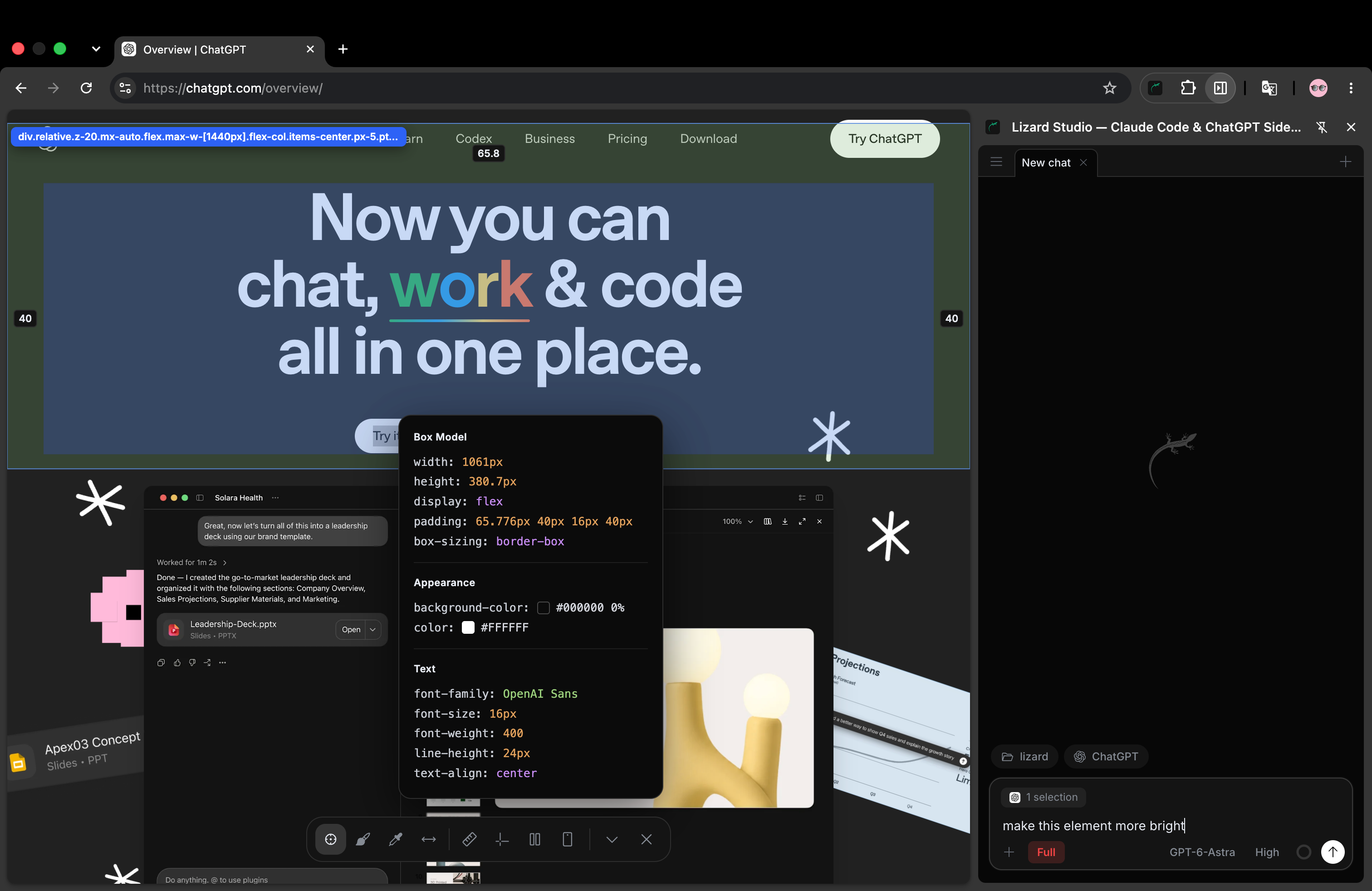
A real Lizard Studio session with the ChatGPT connection. Lizard Studio is an independent extension; OpenAI also offers its own ChatGPT browser extension. Read the developer comparison to choose a workflow.
The extension and host are free and open source. Your chosen AI account supplies the agent and model access; its limits and charges still apply. Install Lizard Studio or follow the full setup guide.
What can ChatGPT do with the page?
You can ask the agent to inspect the DOM, read console and network output, take screenshots and interact with the page. The design toolbar adds an element selector, annotations, rulers, gap measurements, a color picker and responsive preview. The chat can use that context when it edits files in your selected folder.
For example, you can attach a button and ask the agent to find its source, change its spacing and check the rendered result. You can also attach a marked screenshot when the issue involves several elements. The Lizard Studio README describes the browser tools and the local connection.
This is useful when a task combines page context and code access. A question such as “Why does this button wrap?” needs both the rendered layout and the rules that produce it. Give the agent the selected row and the intended result, then check what it changes.
Why does setup mention Codex?
ChatGPT is the name in the panel; Codex is the local CLI that runs the coding session. Install the CLI, sign in and connect the local host. The package name, terminal command and paths such as ~/.codex/config.toml keep their Codex names.
Lizard Studio does not embed chatgpt.com in an iframe or provide model usage of its own. This distinction matters when choosing a ChatGPT sidebar: to edit a local source file, the tool needs a connection to that file, not just the ability to discuss the visible page.
Connect ChatGPT to your local project
- Add Lizard Studio from the Chrome Web Store.
- Install the Codex CLI with
npm install -g @openai/codexand complete its login. - Run
npx @lizard-build/lizard-studio-host installto register the local host. - Start your website's development server and open its URL in Chrome.
- Open Lizard Studio, start a chat, select ChatGPT and choose the folder containing this website's code.
The host supports macOS, Windows and Linux. It requires Node.js; check the setup guide for prerequisites and connection troubleshooting.
Before making a change, ask the agent to report the current page title and its project folder. If either is wrong, correct the tab or folder first. A page on a deployed domain can look identical to your local version while serving different files.
Try a CSS edit with a result you can check
Use your own page or download the example in the visual editing guide. That example has an action row with a 4px gap. The exercise is to make it 24px by editing the source. For a mobile layout issue, follow the ChatGPT website editing guide: fix a file card that overflows at 390px, then verify the source and the page at two widths.
Select the action row with Selector, then send:
Change the gap between the selected row's buttons to 24px.
Edit the local source file, show the diff and check the computed
gap after the page refreshes. Keep the labels, colors and the
space between other cards unchanged.
Review the diff before accepting it. A useful result changes the rule that owns the action row, rather than increasing spacing across every button on the site. Check the page at a narrow width too: the buttons should still fit or wrap as intended.
Refresh once more. If the gap returns to 4px, check which file changed and which URL the browser serves. Ask the agent to read the computed style again. The desired outcome is a small file edit plus a visible, persistent result.
Temporary page edits and source edits
| Action | Where it takes effect | What happens after refresh |
|---|---|---|
| Change an element's inline style in the DOM | The current tab | The page normally restores its original style. |
| Edit CSS or a component in the selected project | Your local files | The change remains when the dev server serves the edited source. |
| Deploy the edited project | The chosen hosting environment | The deployed version changes after the release succeeds. |
Ask explicitly for a source edit when you want to keep the result. Page access alone does not grant access to the source of a site you do not own. You can inspect a reference site, but lasting changes require access to its project and a release process.
What differs between the two agents?
Both Claude Code and ChatGPT can use the browser connection and design context in Lizard Studio. Choose the agent whose account and project setup you already use.
Some chat features differ: the README lists Remote Control and editing past messages for Claude Code, and says those features are unavailable in the ChatGPT panel. Check the current feature notes before choosing based on a specific chat control. For a broader choice of interface, read the Claude Code GUI comparison.
Common questions
Can I use my existing ChatGPT account?
Connect through the Codex CLI's supported sign-in flow. Your account must provide access to the selected agent; Lizard Studio does not supply a subscription or change provider limits.
Do I need an account with Lizard?
No. You connect your own agent and local folder. A Lizard account is separate from using the extension.
Does my code stay on my computer?
Your project files stay in their local folder, and the extension and host run locally. Requests to a cloud model can include code and page context. Lizard Studio does not run a chat server; the chosen provider processes the requests. Read the privacy policy for the data flow.
Does this work as a drag-and-drop page builder?
The documented workflow is to select or annotate the page and ask the agent to edit the code. The toolbar helps inspect and measure the design. Use the visual editing guide to try that workflow before choosing it for your project.