
AI Agent Memory with Redis: Remember Users Across Sessions



AI agent memory with Redis lets your application save context between model calls and load it when the same user returns. The model sees that context in its next request. Redis holds the data; your application decides what to keep, retrieve and forget.
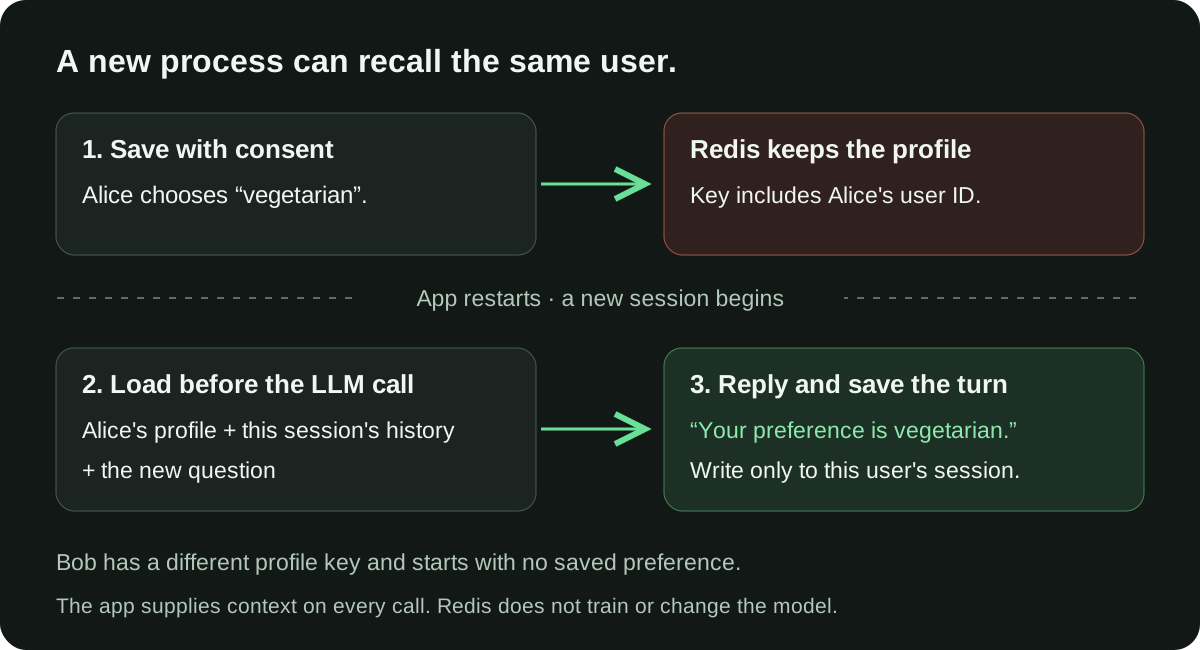
In this guide, a small Python assistant remembers that Alice prefers vegetarian meals. We stop one Python process, start another with a new session ID, and ask it to recall her preference. Bob gets a separate profile. A forget command removes Alice's live Redis records.
You can run the example locally, then connect the same code to Managed Redis in Lizard. It uses standard Redis Hash and List commands, so this walkthrough needs no vector index, RedisJSON or agent framework.
Tested on September 25, 2026: Python 3.12.10, Redis 8.8.0, redis-py==5.2.1 and four live calls to openai/gpt-4.1-mini through OpenRouter. All 16 checks passed. The test covered separate application processes and sessions on a local Redis instance. It did not cover a hosted instance, concurrent requests or recovery from a Redis crash.
What should an AI agent remember?
Start with two kinds of data. They need different keys and retention rules.
| Memory | What it contains | Redis type | Retention in this example |
|---|---|---|---|
| User profile | A preference the user explicitly saves | Hash | 30 days after the last profile write |
| Session history | Recent user messages and assistant replies | List | Latest 20 messages; expires 24 hours after the last completed turn |
The profile belongs to the user, so a new session can read it. Conversation history belongs to one user and one session. Starting a second session does not copy the first session's transcript.
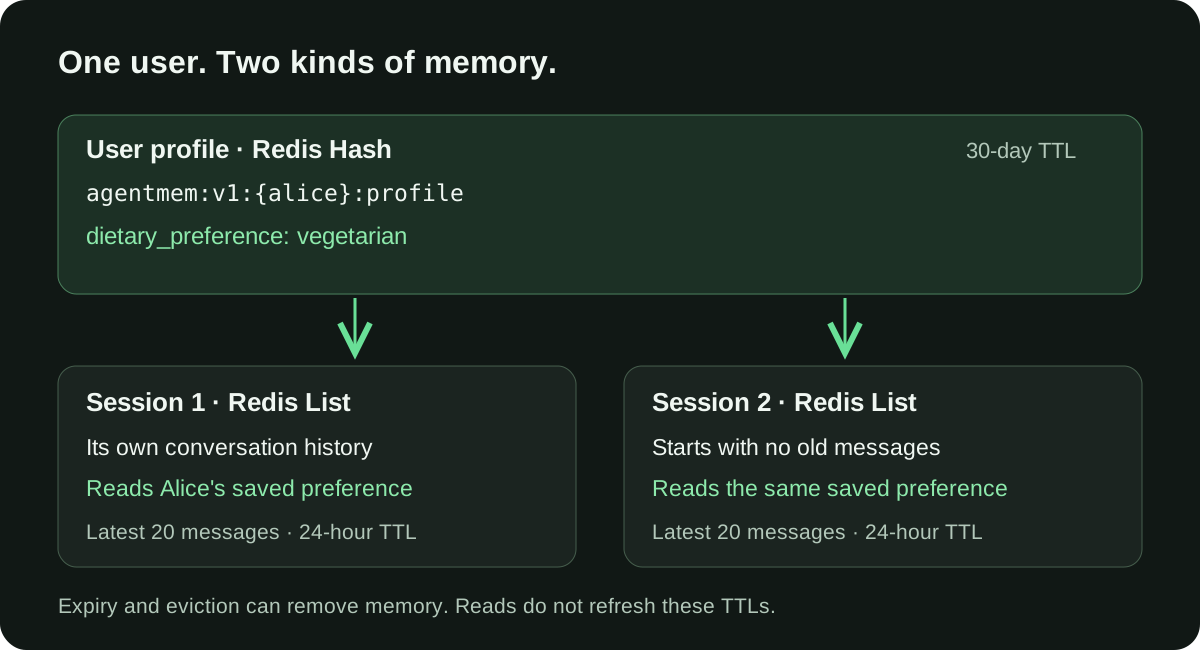
This distinction matters when the agent answers “What do you know about me?” A recent message can disappear from a bounded history list. A saved preference has its own retention period. Neither has to stay in the model's context forever.
Redis also offers a separate Redis Agent Memory service. This tutorial builds a small memory layer in application code using a Redis connection. It does not use that service or its automatic extraction features.
1. Set up the demo
You need Python 3.10 or later, a disposable Redis instance and an OpenRouter API key. Use invented preferences while testing: the saved profile and selected chat messages go to the model provider on each call.
Download the complete, tested program and install its one Python dependency:
mkdir redis-memory-demo
cd redis-memory-demo
python3 -m venv .venv
. .venv/bin/activate
python -m pip install redis==5.2.1
curl -fsSLo memory_agent.py \
  https://lizard.build/blog-examples/redis-agent-memory/memory_agent.py
For a local test, run Redis in a separate terminal. This command binds it to loopback on port 6387; keep that terminal running:
redis-server --bind 127.0.0.1 --port 6387 --save "" --appendonly noThis local Redis process is deliberately disposable. Its data remains available when the Python application exits, but stopping Redis loses that data. The test below restarts the application, not the database.
Create a private .env file in the demo directory using your editor:
REDIS_URL=redis://127.0.0.1:6387/0
OPENROUTER_API_KEY=replace-with-your-key
OPENROUTER_MODEL=openai/gpt-4.1-mini
Keep .env out of Git. Restrict access and load it into the current shell:
chmod 600 .env
set -a
. ./.env
set +a
The example calls the OpenRouter Chat Completions API. Redis handles the same memory reads and writes if you replace the model call with another provider.
2. Give each user and session their own keys
The program creates keys like these:
agentmem:v1:{alice}:profile
agentmem:v1:{alice}:session:session-1
agentmem:v1:{alice}:session:session-2
agentmem:v1:{bob}:profile
The version prefix gives future data formats a separate namespace. The user ID separates profiles. The session ID separates conversations. The braces are a Redis hash tag; they keep one user's keys in the same hash slot if you later use Redis Cluster. This guide tests a single Redis instance.
The demo validates IDs before building keys. In a web application, derive the user ID from the authenticated server session. Do not accept another user's ID from a request body and treat it as proof of identity. Redis key names alone do not enforce who can access a user's data.
3. Save an explicit preference
Save Alice's choice:
python memory_agent.py remember --user alice --preference vegetarianThe command prints Preference saved. Internally, it writes a field to a Redis Hash and sets the profile's expiry in a transaction:
with client.pipeline(transaction=True) as tx:
    tx.hset(profile, mapping={"dietary_preference": preference})
    tx.expire(profile, 30 * 24 * 60 * 60)
    tx.execute()
The only allowed values are vegetarian, vegan and no_preference. That small schema makes the example easy to inspect. The model cannot write arbitrary claims into the profile. In a real product, a “Remember this” control can make the same validated write after the user confirms it.
This guide does not infer preferences from every chat message. Changing or correcting a preference uses the same explicit command, which overwrites that field and renews its 30-day TTL.
4. Load memory before calling the model
Ask the assistant to recall the saved choice:
python memory_agent.py chat --user alice --session session-1 \
  --message "What dietary preference have I saved?"
In our test, the model replied:
Your saved dietary preference is vegetarian.For each call, the application reads the user's profile and the current session's recent messages. It builds the model request in this order:
- Instructions that define the assistant's task.
- A data message containing the allowed saved preference.
- This session's recent user and assistant messages.
- The new user question.
The model has no direct Redis credentials or general database tool. It only receives the selected context. After a successful reply, the app stores the new user and assistant messages together:
with client.pipeline(transaction=True) as tx:
    tx.rpush(history, *rows)
    tx.ltrim(history, -20, -1)
    tx.expire(history, 24 * 60 * 60)
    tx.execute()
Each turn contributes two messages, so the list keeps the last ten complete turns. The app also caps each message at 2,000 characters. A message count alone would not bound context size if one message could contain an entire book.
In this example, reading memory does not renew its expiry. Profile writes renew the profile TTL; completed chat turns renew the session TTL. See the Redis EXPIRE reference for how expiry interacts with updates.
5. Start a new process and a new session
Each CLI command starts and exits its own Python process. Run a second chat command with a different session ID:
python memory_agent.py chat --user alice --session session-2 \
  --message "What dietary preference have I saved?"
The model again returned Your saved dietary preference is vegetarian. The new session began without the first conversation's messages. Its request contained the shared user profile, which was enough to answer.
Inspect the records the application reads:
python memory_agent.py inspect --user alice --session session-2You should see a profile with dietary_preference and a history with that session's user question and assistant answer. The model has not learned a new weight or gained permanent internal memory. The application supplies the stored context on each request.
6. Check user separation and forgetting
First, inspect another user's context:
python memory_agent.py inspect --user bob --session session-1For a fresh Bob profile, the result is:
{
  "profile": {},
  "history": []
}
Asking Bob's assistant the same preference question produced Your dietary preference is unknown. in our test. The empty context is the deterministic isolation check; model wording can vary.
Next, stop any requests for Alice and remove her live Redis memory:
python memory_agent.py forget-user --user alice
python memory_agent.py inspect --user alice --session session-1
python memory_agent.py inspect --user alice --session session-2
Both inspections should return empty profiles and histories. The command scans only Alice's validated key prefix and unlinks matching keys. It leaves Bob's keys alone.
For a deployed app, block new writes for that user while deletion runs. Otherwise, a reply that finishes during the scan could recreate a session. Deleting Redis keys also does not delete provider logs, backups or records in another database; those stores need their own retention and deletion rules.
What we tested
The verification script starts a new Redis process on an available loopback port. It never connects to an existing database. Its saved results record the versions, scope and four model replies.
| Check | Result |
|---|---|
| A saved preference survives separate Python processes | Passed |
| A new session loads the profile without the old transcript | Passed |
| Another user starts with an empty context | Passed |
| Expired profile and session keys disappear | Passed |
| History stays within 20 messages and preserves complete turns | Passed |
| Forgetting removes both sessions and the profile, leaving another user intact | Passed |
| Live model calls recall the preference before deletion and report it unknown afterward | Passed |
The harness ran 16 checks in total. These results show that the example's reads and writes work as described. They do not establish a production availability or data recovery guarantee.
Connect the example to Managed Redis
After the local test, create a separate Redis instance for your project. In a linked Lizard project, run:
lizard add redisFor a deployed service named api, set the connection reference and redeploy:
lizard secrets set REDIS_URL='${{redis.REDIS_URL}}' --service api
lizard redeploy --service api
These commands assume the service already exists and has its model API key configured. They connect that service to Redis; the CLI demo itself is not an HTTP server. Follow the Managed Redis connection guide for environment variables and access from your computer.
You can inspect the demo's keys in the Redis browser in the dashboard. Keep Redis credentials on the server, and use a private connection or verified TLS when your provider supplies it. A plain redis:// URL does not add transport encryption.
Decide which memories must survive data loss
Memory surviving an application restart does not mean it survives every Redis failure. Expiry, key eviction, persistence settings and backups all matter.
Managed Redis currently documents an allkeys-lru eviction policy: memory pressure can remove any key, including a profile whose TTL has not elapsed. For preferences you cannot afford to lose, keep the source record in Managed Postgres and use Redis for recent context or a reloadable copy. Review the storage and recovery guide before choosing a retention policy.
Before you put this behind a web API
The CLI keeps the example small. A shared application also needs:
- Authentication and ownership checks. Derive user IDs on the server and check that each session belongs to that user.
- One active turn per session. Queue or lock the full read → model call → write sequence. The final Redis transaction alone does not stop two model calls from reading the same old context.
- A memory size budget. Bound profile fields, message size, history length and the number of sessions. Monitor Redis memory and evictions.
- A Redis failure policy. Fail the request clearly or offer an explicitly stateless mode. Never claim a preference was saved when the write failed.
- Separate authority from remembered text. A saved message can contain hostile instructions. Keep permissions and tool decisions in application code; a system prompt is not an access-control boundary.
Common questions
Do I need a vector database for AI agent memory?
You can load a known user's explicit preferences and recent messages by key, as this example does. Vector search becomes useful when the application must find relevant facts in a much larger set of memories. That adds embeddings, index configuration and retrieval tests.
Does Redis make an agent remember forever?
Retention depends on TTLs, eviction, persistence and your application's writes. This example deliberately expires data. Keep durable records elsewhere when losing them would break the product.
Is this RAG or a semantic cache?
This example retrieves one user's saved context. RAG commonly retrieves relevant source material to help answer a question. A semantic cache reuses a prior answer for a similar query. They can share Redis infrastructure, but they need different data models and tests.
Can I use LangGraph later?
Yes. LangGraph offers checkpoints for conversation state and stores for memory across threads. Its Redis integration has its own requirements; check the LangGraph Redis package documentation before replacing this simple client with a framework backend.
Give your agent a memory you can inspect
Start with one explicit fact, a separate session history and a test that crosses a process boundary. Add expiry, ownership checks and a way to forget before you add automatic extraction or vector search.
Create Managed Redis for the application's shared context. If your agent also needs to query structured project data, the Postgres MCP guide covers that connection with a separate database reader role.
Build with AI. Ship with Lizard.
You don't need a platform team to go live. Your whole cloud, one CLI command away.
- Workspaces
- —
- Services
- —
- Add-ons
- —
- Deployments
- —