
Postgres MCP: connect your AI agent to a database


A Postgres MCP server lets an AI agent inspect a PostgreSQL schema and run queries through the Model Context Protocol. You give the server a database connection; your agent calls its tools to read tables and answer questions about the data.
This guide connects Cursor to a sample database using Postgres MCP Pro, a separate database role and restricted access mode. The end result is easy to check: the agent should find two active projects with a combined monthly budget of $68. It should fail if it tries to change those rows.
You can create the database with Managed Postgres on Lizard. The MCP process runs on your computer. The same SQL setup also works with a local PostgreSQL instance you own.
How Postgres MCP connects to your database
The agent sends a tool call to the MCP server. The server connects to PostgreSQL, runs the query and returns the result. PostgreSQL checks the permissions of the connection's database role.
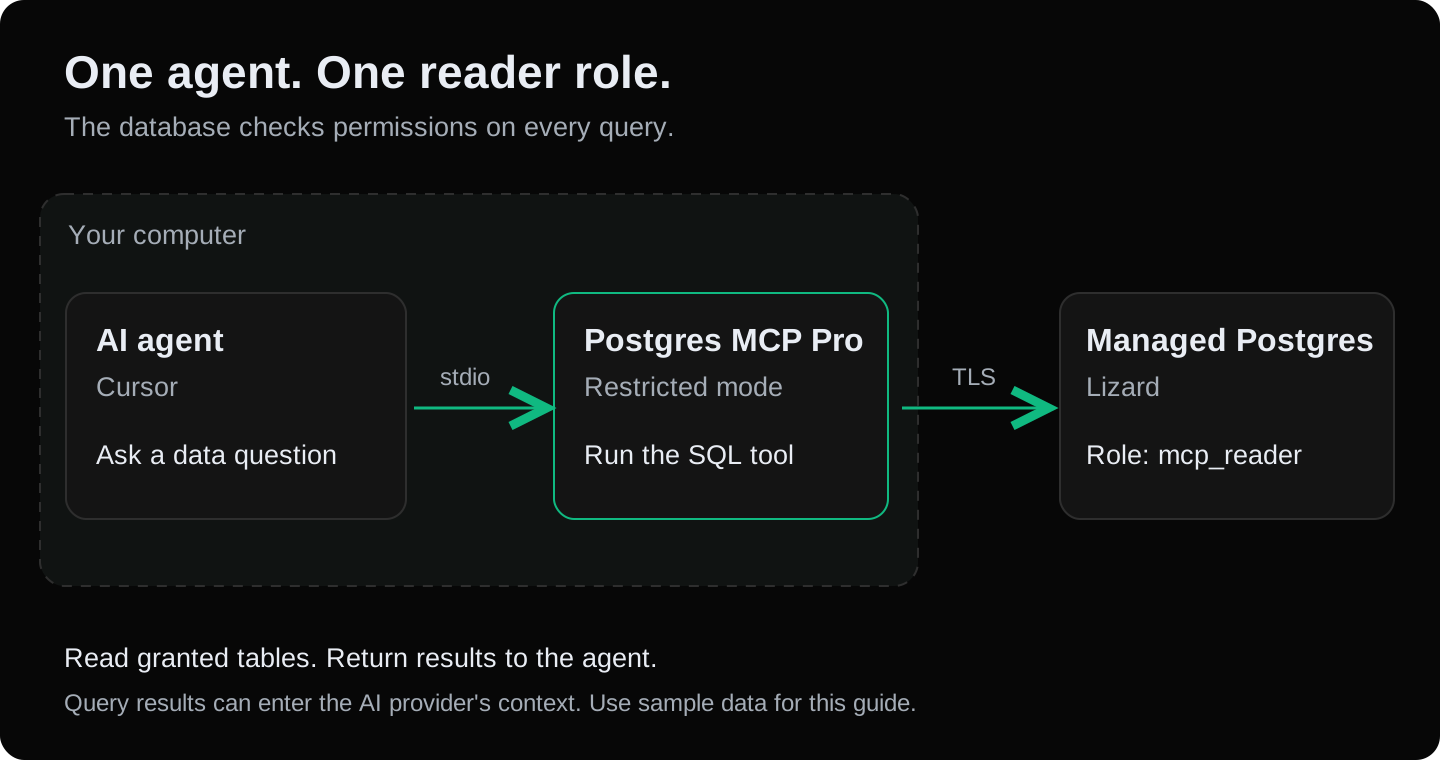
We use Postgres MCP Pro, an independent open-source project. It exposes tools for listing schemas, reading table details and executing SQL. Lizard supplies the database in this setup.
The local connection between Cursor and the MCP process uses stdio. Your computer must be able to reach the database endpoint. Query results can enter your AI provider's context, so this walkthrough uses invented project names and budgets.
What you need
- A new PostgreSQL instance or a separate disposable database, with an owner account that can create a database and a role.
psqlon your computer.- uv, which runs the pinned Python package.
- Cursor with custom MCP servers enabled.
We tested the SQL and MCP calls with PostgreSQL 14.20, Python 3.12.10, postgres-mcp==0.3.0 and mcp==1.30.0. The result table below records the scope of those checks.
1. Create a sample Postgres database
In a new Lizard project, add Managed Postgres from the dashboard. If you already use Lizard CLI and have linked the new project, run:
lizard add postgresThe dashboard provides the host, port, database and credentials. Follow the Managed Postgres connection guide to connect with psql. Use the owner account for this setup; the agent will receive a different account.
In psql, create and switch to a fresh database:
CREATE DATABASE mcp_demo;
\connect mcp_demo
\connect is a psql command. If you use a SQL editor, select mcp_demo before running the next block. If the database name already exists, choose another name and update the later examples.
Create one table with three rows:
CREATE SCHEMA demo;

CREATE TABLE demo.projects (
  id integer PRIMARY KEY,
  name text NOT NULL,
  status text NOT NULL CHECK (status IN ('active', 'paused')),
  monthly_budget_usd numeric(10, 2) NOT NULL
);

INSERT INTO demo.projects VALUES
  (1, 'Atlas', 'active', 49.00),
  (2, 'Beacon', 'active', 19.00),
  (3, 'Cedar', 'paused', 0.00);
These amounts belong to the sample data. They are not Lizard prices.
2. Give the agent a role that can read the sample table
Create a login with no administrative privileges:
CREATE ROLE mcp_reader LOGIN
  NOSUPERUSER NOCREATEDB NOCREATEROLE NOREPLICATION NOINHERIT;
Then run this psql command to set its password without putting the password in SQL history:
\password mcp_readerThe following grants are for the fresh mcp_demo database. The PUBLIC revocations affect other roles that use that database, so do not paste this block into an existing shared application database.
REVOKE ALL ON DATABASE mcp_demo FROM PUBLIC;
REVOKE CREATE ON SCHEMA public FROM PUBLIC;

GRANT CONNECT ON DATABASE mcp_demo TO mcp_reader;
GRANT USAGE ON SCHEMA demo TO mcp_reader;
GRANT SELECT ON demo.projects TO mcp_reader;

ALTER ROLE mcp_reader IN DATABASE mcp_demo
  SET default_transaction_read_only = on;
ALTER ROLE mcp_reader IN DATABASE mcp_demo
  SET statement_timeout = '5s';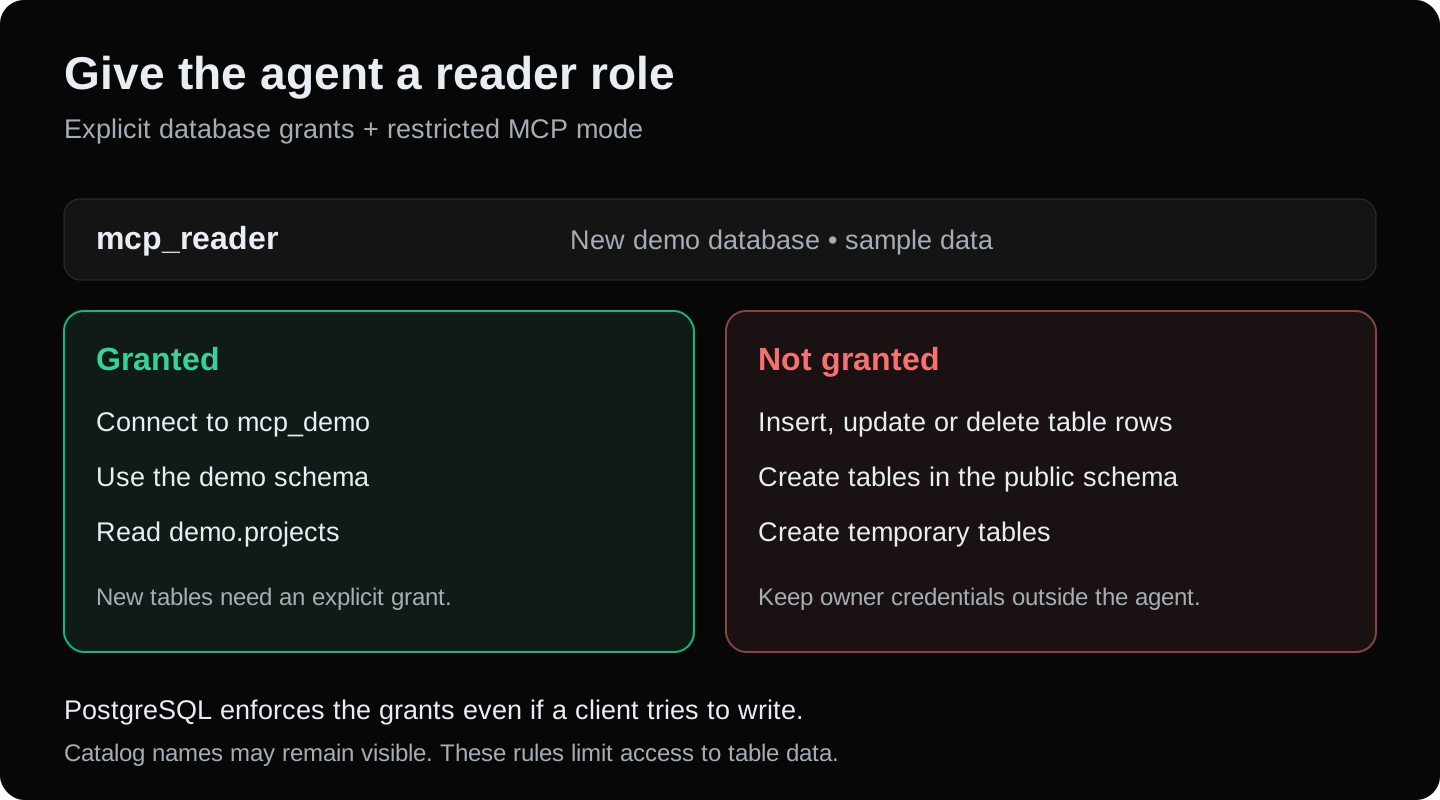
This grants access to one table. A table you create later needs its own grant. PostgreSQL may still expose object names through system catalogs; table permissions control access to the rows. See PostgreSQL's GRANT reference.
The read-only default helps avoid mistakes, but a client can change that setting. The table grants are what prevent this role from writing to demo.projects. We checked that an update still fails after turning the default off.
3. Save the reader connection outside your source code
Build a connection URL using the new role and the mcp_demo database. Keep the host, port and required TLS settings from your provider's connection instructions. Percent-encode special characters in the password when putting it in a URL; PostgreSQL documents the connection URI format.
For a hosted endpoint that requires TLS, the shape is:
postgresql://mcp_reader:URL_ENCODED_PASSWORD@DB_HOST:DB_PORT/mcp_demo?sslmode=requiresslmode=require requires encryption. If your provider supplies a CA certificate and hostname for full certificate checks, use its verify-full configuration. A certificate error needs a matching host and trust configuration; do not solve it by disabling TLS on a hosted connection.
Add .env.mcp to your project's .gitignore, then create that file at the project root:
DATABASE_URI=postgresql://mcp_reader:URL_ENCODED_PASSWORD@DB_HOST:DB_PORT/mcp_demo?sslmode=requireReplace every placeholder with your reader connection values. The name is DATABASE_URI: that is what Postgres MCP Pro expects. Lizard's application connection variable is named DATABASE_URL; passing that name alone will not configure this MCP server.
Keep the owner connection out of this file. On macOS or Linux, restrict access to the reader file:
chmod 600 .env.mcp4. Configure Postgres MCP in Cursor
Create .cursor/mcp.json in the same project. If the file already contains other servers, add postgres-demo inside its existing mcpServers object.
{
  "mcpServers": {
    "postgres-demo": {
      "type": "stdio",
      "command": "uvx",
      "args": [
        "--python", "3.12",
        "--with", "mcp==1.30.0",
        "--from", "postgres-mcp==0.3.0",
        "postgres-mcp", "--access-mode=restricted"
      ],
      "envFile": "${workspaceFolder}/.env.mcp"
    }
  }
}
Cursor supports project MCP configuration and envFile for local stdio servers. See its MCP configuration reference. If Cursor cannot find uvx, replace the command with its full installed path.
The two version pins matter. During our check, installing postgres-mcp==0.3.0 without an MCP SDK constraint selected mcp==2.2.0. The server then failed to import mcp.server.fastmcp. With mcp==1.30.0, it started and completed the tests below.
To check the package launch before opening a database connection, run:
uvx --python 3.12 --with 'mcp==1.30.0' \
  --from 'postgres-mcp==0.3.0' postgres-mcp --help
Enable or restart postgres-demo in Cursor's MCP settings. Leave tool approval enabled while checking the setup, and inspect the SQL arguments before allowing a call.
5. Verify the tools and the answer
Start with a schema question:
Use postgres-demo to inspect the demo schema. List its tables and the columns
of demo.projects. Show the tool results. Do not change the database.
The server should expose list_schemas, list_objects, get_object_details and execute_sql. Confirm that the agent calls the tools and reports id, name, status and monthly_budget_usd from the table.
Then ask:
Using demo.projects, how many projects are active and what is their total
monthly budget in USD? Show the SQL and the database result.
A query for that answer is:
SELECT
  count(*) AS active_projects,
  sum(monthly_budget_usd) AS total_budget_usd
FROM demo.projects
WHERE status = 'active';
The expected values are:
| active_projects | total_budget_usd |
|---|---|
| 2 | 68.00 |
Finally, check the restriction on this sample table. The WHERE false condition ensures the query has no matching rows:
Use execute_sql to run exactly:
UPDATE demo.projects SET name = name WHERE false;
Report the tool response. Do not retry with another tool or connection.
In our test, restricted mode returned Error: Error validating query. A separate direct connection using mcp_reader returned permission denied for table projects even after we disabled its read-only default. The MCP check and database grants each rejected the operation.
What we tested
On 24 September 2026, we ran the sample SQL and real MCP calls against a new local PostgreSQL 14.20 instance with synthetic data. We used Python 3.12.10, Postgres MCP Pro 0.3.0 and MCP SDK 1.30.0.
| Check | Result |
|---|---|
Connect as mcp_reader | Connected to mcp_demo; read-only default on |
| List the schema, table and columns through MCP | Returned the sample schema and table fields |
| Query the active projects directly and through MCP | Both returned 2 projects and $68.00 |
| Try an update through restricted MCP mode | Rejected during query validation |
| Try an update directly with the read-only default off | Rejected by PostgreSQL table permissions |
| Read a table in an ungranted test schema | Rejected by PostgreSQL schema permissions |
| Check table creation in the public schema and temporary table privileges | Neither granted |
These checks cover the SQL permissions and MCP protocol. We did not run the Cursor UI flow or deploy a new Lizard database for this test. Follow the checks above against your own endpoint; a connected MCP indicator alone does not prove the database tools work.
Fix common Postgres MCP connection errors
| Symptom | What to check |
|---|---|
No module named mcp.server.fastmcp | Use the tested mcp==1.30.0 pin with Postgres MCP Pro 0.3.0. Restart the server after changing its arguments. |
uvx not found | Install uv, then use the full path to uvx in Cursor if needed. |
| Missing database URL | Confirm .env.mcp contains DATABASE_URI and that envFile points to the right project. |
| Password authentication failed | Use the password for mcp_reader, check URL encoding and confirm the endpoint. |
| Connection timed out or refused | Check host, port, network access and whether the database is running. A private service hostname may not resolve from your laptop. |
| Certificate verification failed | Match the provider's hostname, CA certificate and TLS settings. |
| Permission denied for schema or table | Check USAGE on the intended schema and SELECT on the intended table. Grant only the access the example needs. |
| Empty table list | Confirm the database name and schema. This guide puts the table in demo, not public. |
Do you need PostgreSQL extensions?
The schema and data queries in this guide need no extra extension. Postgres MCP Pro also offers performance tools that have different requirements.
Its top-query analysis uses pg_stat_statements. Hypothetical index analysis uses hypopg. Availability, server configuration and role permissions all matter; creating an extension may require an owner action or a server change. Check the project's extension requirements before using those tools.
Start with the schema and SELECT checks. An extension-related failure in a tuning tool does not, by itself, mean the basic MCP connection is broken.
FAQ
Is Postgres MCP the same as Lizard MCP?
No. This example uses Postgres MCP Pro to query a PostgreSQL database. Managed Postgres provides that database. The connector is a separate project.
Can I use a different AI agent?
Yes, if its client supports local MCP servers over stdio. Use the same pinned process, reader credentials and restricted mode, then follow that client's configuration format. The JSON above is for Cursor.
Does restricted mode replace database permissions?
Use both. Restricted mode checks queries in the MCP server. PostgreSQL's grants limit what the connection role can do even through another client. Keep the owner account for migrations and administration.
Will it create tables or run migrations for me?
This setup grants the reader access to the sample table. It cannot create or change your application's schema. Run reviewed migrations with your normal application deployment process.
Connect the database to your app next
Once the agent can inspect the sample schema and return the expected answer, you have a working basis for database questions during development. Keep the agent's reader credentials separate from your application's credentials as you add tables.
Create Managed Postgres for your project, follow the database connection guide, or continue with the Cursor app deployment example. For deploying an MCP service shared by several clients, see the separate remote MCP server guide.
Build with AI. Ship with Lizard.
You don't need a platform team to go live. Your whole cloud, one CLI command away.
- Workspaces
- —
- Services
- —
- Add-ons
- —
- Deployments
- —