
Claude Code Headless: Check Your Deployment from the Terminal



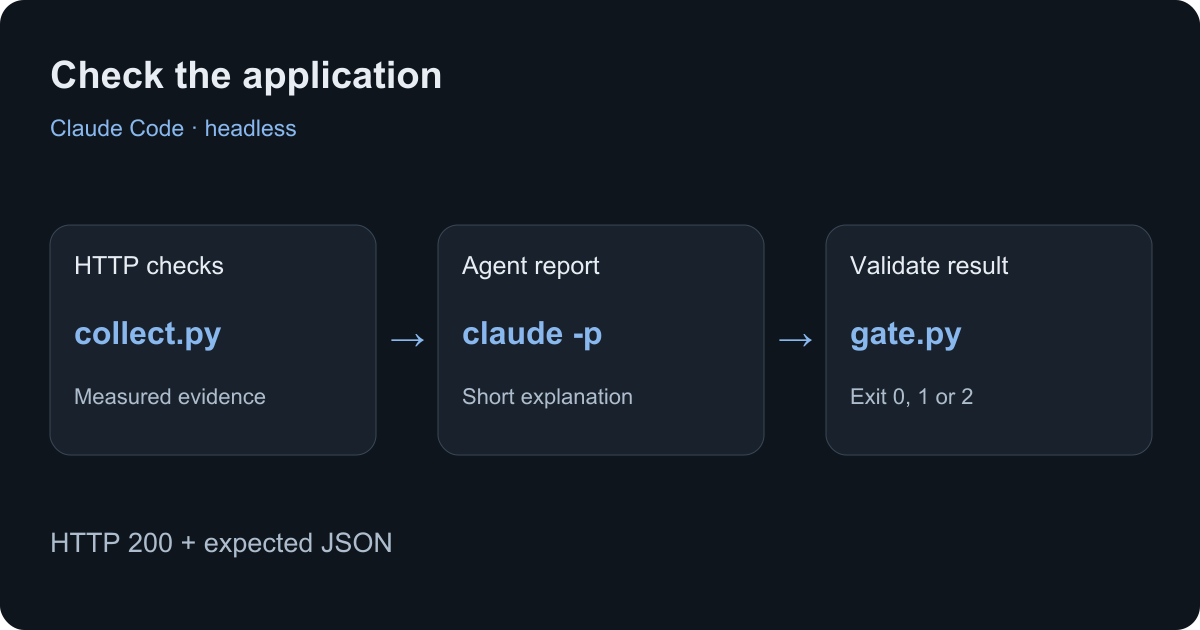
Claude Code headless mode runs a prompt from your terminal with claude -p and exits when the task finishes. You can pipe in data, save the answer and call it from a script. This guide uses it to explain deployment checks: a health endpoint, a price quote and a report that your script can verify.
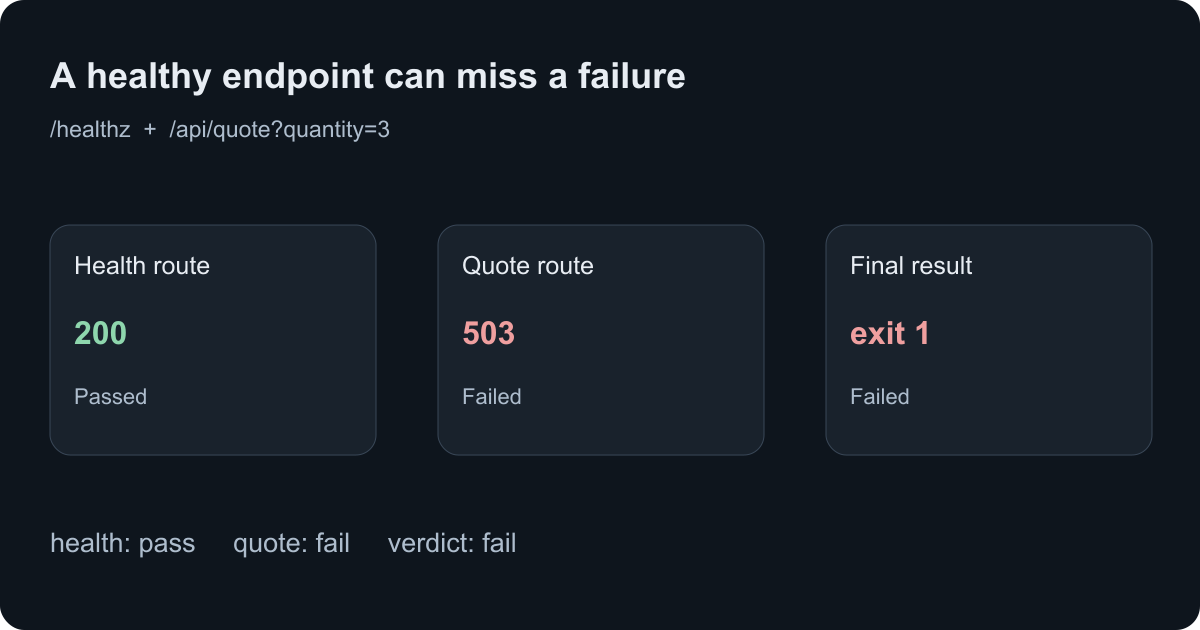
The example catches a common failure: /healthz returns HTTP 200 while a real application route returns 503. You will get a reproducible demo, a JSON report and a nonzero exit code when the application check fails.
Start with one non-interactive command
With Claude Code installed and signed in, run:
claude -p "Explain what an HTTP 503 response tells me in two sentences." \
  --tools ""
-p means print the result and exit. --tools "" disables the built-in tools for this question. Claude can answer from the prompt without reading your repository or running a shell command. The Claude Code CLI reference lists the available flags.
For a deployment check, give the model observations that your script has already collected. This makes each HTTP request and pass condition easy to inspect. It also keeps deployment credentials out of the model's input.
What you need
Use Python 3.10 or later, a current Claude Code installation and an authenticated account. The demo uses Python's standard library, so it has no Python packages to install. Run the shell examples in Bash or Zsh on macOS or Linux.
Check the installed CLI and its authentication state:
claude --version
claude auth status
If a request fails because the saved session has expired, run claude auth login and retry. A saved login can exist even when the next API request cannot refresh it.
For the optional hosted checks, install Lizard CLI and sign in to your own project. If you still need to deploy your application, follow Deploy from Claude Code first.
Download the example and start the demo
Create a new folder and download the six files. Read them before running them. The demo accepts GET requests and keeps no customer data.
mkdir claude-deployment-check
cd claude-deployment-check
for file in demo.py collect.py gate.py run.py report.schema.json verify.py; do
  curl --fail --silent --show-error \
    "https://lizard.build/blog-examples/agent-deployment-checks/$file" \
    --output "$file"
done
python3 demo.py --port 8787
Leave that terminal running. In another terminal, change to the same folder. The demo exposes /healthz and /api/quote?quantity=3. Each item costs 1,200 cents; a quote for three items must return currency: USD and total_cents: 3600.
These are demo routes. For your own application, edit the paths and expected fields in collect.py and gate.py. Choose a small operation a user actually needs: reading a seeded record, calculating a price or fetching a saved document. A route that only returns “OK” cannot verify those operations.
Collect evidence before asking Claude
python3 collect.py http://127.0.0.1:8787 > evidence.jsonThe collector makes two requests with a five-second timeout for each. It rejects redirects, invalid JSON and responses larger than 64 KiB. It checks both the HTTP status and the expected JSON fields. It records the time, expected values and check results; it does not copy arbitrary response text into the prompt.
That last choice matters when an endpoint contains user text. A support message or database row can contain instructions aimed at an agent. This example gives Claude a small set of measured fields to explain.
The collector exits successfully when it writes evidence, including evidence of a failed check. The final check script determines whether the job passes. Keep those two meanings separate in your automation.
Ask for a structured report
Run this from the folder containing the downloaded files:
claude --safe-mode -p \
  "Explain the evidence on stdin. Use no tools. Copy its verdict. List the names of failed checks in failed_checks. Give a short summary and one next_step. Do not infer a root cause from HTTP status alone." \
  --tools "" \
  --no-session-persistence \
  --output-format json \
  --json-schema "$(cat report.schema.json)" \
  < evidence.json > claude-result.json
The example uses --safe-mode to disable customizations such as hooks, plugins and MCP servers during this report task. It uses the existing account login. Check your installed version's help if it does not recognize the flag.
Claude's response has an outer result object. When you supply the schema, the report sits inside structured_output. The outer object also carries run metadata and an is_error field. A plain JSON response and a schema-constrained response serve different purposes; parse the field your command requested.
The schema asks for four fields:
| Field | Purpose |
|---|---|
verdict | pass or fail, copied from the checks |
failed_checks | Names of the checks that failed |
summary | A short explanation of the observed result |
next_step | One concrete follow-up |
The programmatic execution documentation describes these output formats. A valid JSON shape does not establish whether the explanation is correct, so the wrapper checks the report against the measured results.
Run the complete check
run.py collects fresh evidence, calls Claude with a 180-second process timeout, extracts the report and checks it. Give each run a new output directory:
python3 run.py claude http://127.0.0.1:8787 runs/healthyThe directory contains evidence.json, claude-result.json, report.json and stderr.log. Keep the raw result when debugging a failure; an authentication error can appear in the result on stdout.
The wrapper uses three exit codes:
| Exit code | Meaning |
|---|---|
0 | Both application checks passed and the report agreed |
1 | At least one application check failed and the report agreed |
2 | The reporting job failed, timed out or returned invalid or contradictory output |
Code 0 from the Claude process means the agent run completed. The wrapper makes the separate decision about the application. An invalid report cannot turn a failed HTTP check into a successful job.
Reproduce a failure that a health check misses
Start a second demo in another terminal:
python3 demo.py --port 8788 --brokenThen run:
python3 run.py claude http://127.0.0.1:8788 runs/brokenThe second demo still answers /healthz with HTTP 200. Its quote route returns HTTP 503. The evidence therefore records fail, with quote as the failed check. With a valid Claude response, the wrapper exits 1.
You can also test the HTTP checks and validation logic without calling a model:
python3 verify.pyThis checks the healthy and broken demos, then verifies that the gate rejects a false success report and incomplete evidence. It does not use Claude credits.
Apply the check to an application on Lizard
Choose the application URL from your project. Inspect the current project context and service state with Lizard CLI:
lizard skills get core --json
lizard status --json
lizard ps --project YOUR_PROJECT --json
lizard logs --project YOUR_PROJECT --service YOUR_SERVICE --tail 100 --json
lizard status shows the local folder's link. lizard ps reads the service state for the selected project. JSON logs return a bounded snapshot and exit; they do not keep following the service.
Use the service's public URL with the same checker after you adapt the two route assertions to your application. If you host the supplied demo itself, bind it to 0.0.0.0 and configure the service's port to match. The local examples bind to 127.0.0.1.
Read logs around the recorded check time when a route fails. An HTTP 503 alone cannot tell you whether the cause was a database connection, a dependency or application code. Review and redact any logs before adding them to a model prompt.
For applications that depend on stored data, add a test with a known record. The Postgres MCP guide explains scoped database access, and the Redis MCP guide covers restricted Redis reads. Use test data and credentials suited to the check.
Headless mode, authentication and unattended jobs
Headless mode describes how you run the command. It does not create an unattended login or remove tool permissions. For a scheduled job, prepare authentication on the runner and use an explicit timeout.
Claude also offers --bare, which skips much of the normal startup context. Its Anthropic authentication path uses ANTHROPIC_API_KEY or a configured API key helper; it does not read subscription OAuth credentials. Our account-login example therefore uses --safe-mode. Review the current documentation before moving the job to CI, where the authentication setup may differ.
For live progress, Claude supports --output-format stream-json --verbose. Each line is an event. Use plain json when you only need one final result, as this example does. Avoid resuming an old conversation for an independent deployment check; each run should use fresh observations.
Troubleshooting
| Symptom | Check next |
|---|---|
| OAuth session expired | Run claude auth login, then retry the actual request |
| The report file contains an error | Inspect the Claude exit code and outer is_error field |
structured_output is missing | Confirm both schema and JSON output flags reached the CLI |
| A tool waits for approval | Decide which operation the job needs; this report task disables built-in tools |
/healthz passes but the wrapper exits 1 | Inspect the quote check and logs at the recorded time |
| The wrapper exits 2 | Inspect stderr, raw result and schema; use a new output directory on retry |
| A hosted route redirects to a login page | Use the correct test endpoint and its intended authentication; the demo checker rejects redirects |
Test scope and next step
On September 28, 2026, we ran the local HTTP and report-validation tests with Python 3.12.10. They covered healthy responses, a broken quote route, a false success report and missing evidence. We checked the command flags against Claude Code 2.1.259, Lizard CLI 4.0.8 and the official documentation. The Claude model response was not part of the completed tests; the report behavior above describes the documented output contract. These synthetic tests do not establish the health of a production application.
For the same pattern with JSONL events and a separate final report file, see Codex Exec deployment checks. To put your own app online, follow the Claude Code deployment guide, then add a check for the operation your users need most.
Build with AI. Ship with Lizard.
You don't need a platform team to go live. Your whole cloud, one CLI command away.
- Workspaces
- —
- Services
- —
- Add-ons
- —
- Deployments
- —