
Vercel Sandbox pricing: costs, limits, and alternatives


Vercel Sandbox pricing depends on how much CPU your code uses and how long you keep memory allocated. In the default US region, Vercel charges $0.128 per active vCPU-hour and $0.0212 per GB-hour of memory. While your agent waits for an AI model, it can stop using CPU, but you still pay for its memory. See Vercel's pricing.
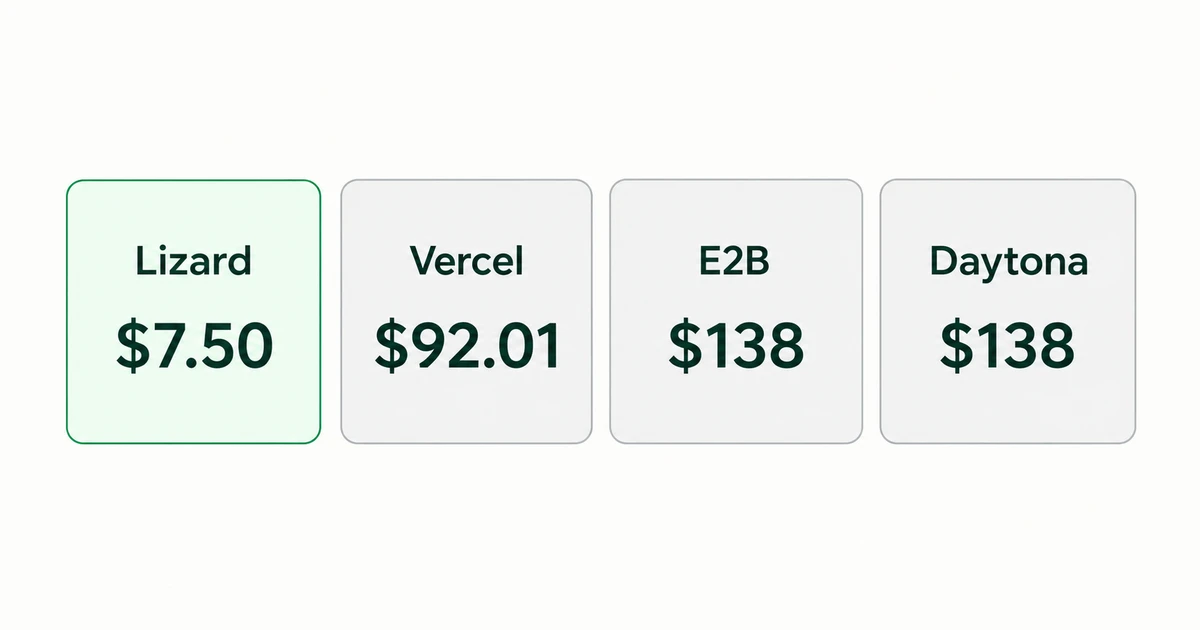
Lizard has the lowest paid compute price of the four providers we compare here. For 10,000 five-minute runs with 2 vCPUs and 4 GB of memory, we calculate $7.50 on Lizard versus $92.01 on Vercel, assuming 10% CPU utilization. That's 91.8% less before credits, subscriptions and any extra storage or transfer charges.
We checked prices on October 5, 2026. This is a Lizard guide, so we're comparing our own product with other providers. We used their official prices and checked Lizard's rate against its billing data. The calculations assume the same stated CPU and memory sizes; actual throughput and reliability need separate tests.
Vercel Sandbox pricing by resource
The Pro rates below apply to iad1. If you plan to run elsewhere, check the regional prices: CPU, memory and some other charges change with location.
| Charge | Published rate | What it means for your estimate |
|---|---|---|
| Active CPU | $0.128 per vCPU-hour | Count CPU execution across all allocated vCPUs |
| Provisioned memory | $0.0212 per GB-hour | Count allocated memory throughout the running session |
| Sandbox creation | $0.60 per million | Add the number of creation calls |
| Snapshot storage | $0.08 per GB-month | Add retained filesystem snapshots |
| Drive storage | $0.05 per GB-month | Add persistent drive data |
| Drive reads / writes | $0.0015 / $0.004 per GB | Add data read from or written to drives |
Source: Vercel Sandbox rates and quotas. Vercel bills memory in minimum increments of one minute. That doesn't affect our five-minute jobs. If your job finishes in a few seconds, include the minimum in your estimate.
An agent waiting for an LLM may use little CPU. A compiler could use most of the available CPU during the same five-minute session. Vercel's explanation of Active CPU billing covers the difference between running code and waiting on I/O.
Record elapsed time and CPU time separately. A job that takes five minutes to finish won't necessarily use five minutes of CPU.
Is Vercel Sandbox free?
Hobby includes 5 active CPU hours, 420 GB-hours of memory and 5,000 creations each month. See the Hobby quotas. You also get 20 GB of data transfer. If you use up an allowance, Vercel pauses new sandbox creation until it resets. You can upgrade to Pro to keep running tasks.
A small project that qualifies for Hobby and stays within those allowances can cost nothing. Keep that in mind when comparing paid rates. The estimates below help you budget for usage beyond free allowances and trial credits.
How the Pro credit changes your bill
Vercel Pro costs $20 a month and includes one deploying seat and $20 in usage credit. You can spend that credit on eligible infrastructure across the account. Extra paid seats add to the bill.
If you use the account only for Sandbox, with one seat and no extras, the bill is:
Monthly Pro bill = $20 + max(0, eligible usage charges - $20)With $9.20 of eligible usage, you pay $20. With $92.01 of usage, you pay $92.01. Simply adding $20 to your usage estimate would count the portion covered by the credit twice.
If you already pay for Pro, check how much credit your other services use. You may have enough left to cover a small sandbox workload. In that case, adding those tasks won't increase your bill.
Worked example: 10,000 agent tasks per month
Each task in this example creates a sandbox, runs for five minutes and stops. We use 2 vCPUs and 4 GB of memory per instance. Vercel runs in iad1, with CPU utilization averaging 10% across the allocation. Each job fits within 5 GB of local workspace storage.
We leave out model tokens, taxes, retained snapshots, persistent drives and billable network traffic. The example assumes a disposable workspace. If you need to keep the result, export it before stopping the sandbox and add any transfer charge to your estimate.
Using the published Vercel rates:
Elapsed sandbox hours = 10,000 × 5 / 60 = 833.333...
Active vCPU-hours     = 833.333... × 2 × 0.10 = 166.666...
Memory GB-hours      = 833.333... × 4 = 3,333.333...

CPU cost             = 166.666... × $0.128 = $21.333...
Memory cost          = 3,333.333... × $0.0212 = $70.666...
Creation cost        = 10,000 × $0.60 / 1,000,000 = $0.006
Vercel usage total   = $92.006, rounded to $92.01

Lizard Small         = 833.333... × $0.009 = $7.50
Most of the Vercel cost here comes from memory. Even if the agent used less CPU, that memory charge would remain. Lizard Small charges a fixed rate for the running sandbox, with CPU, memory and idle time included.
What changes as task volume grows?
| Five-minute runs per month | Total sandbox hours | Vercel usage estimate | Vercel Pro bill, one seat* | Lizard running cost |
|---|---|---|---|---|
| 1,000 | 83.33 | $9.20 | $20.00 | $0.75 |
| 10,000 | 833.33 | $92.01 | $92.01 | $7.50 |
| 100,000 | 8,333.33 | $920.06 | $920.06 | $75.00 |
The Pro bill assumes the full $20 credit is available for these tasks and you incur no other charges. Lizard figures exclude trial credits. We use the same task duration for both providers; test your application to find out how long it takes on each.
You don't need a worker for every task. A small pool can process 100,000 tasks over time. If those tasks arrive at once and need an immediate response, check concurrency limits as well as monthly cost.
What if CPU usage is higher?
Keeping 2 vCPUs and 4 GB allocated for one hour gives these compute costs:
| Average CPU utilization | Vercel CPU + memory | Lizard Small |
|---|---|---|
| 0% | $0.0848 | $0.009 |
| 10% | $0.1104 | $0.009 |
| 50% | $0.2128 | $0.009 |
| 100% | $0.3408 | $0.009 |
Creation fees and extras sit outside this table. Lizard costs less at every CPU level shown, including when Vercel charges nothing for CPU. In that case, Vercel's memory charge alone exceeds Lizard Small's running rate.
Vercel Sandbox alternatives: compare the paid rates
The table compares the advertised 2 vCPU / 4 GB memory class on each service. E2B and Daytona price memory in GiB, so keep their units when working out your own bill.
| Provider | Running rate for this allocation | Usage for 10,000 five-minute runs | Plan or allowance to consider |
|---|---|---|---|
| Lizard Sandboxes | $0.009/hour | $7.50 | No monthly subscription; temporary trial credits excluded |
| Vercel Sandbox | $0.1104/hour at 10% CPU | $92.01 including creation calls | Pro fee and credit as explained above |
| E2B | $0.1656/hour | $138.00 | Hobby supports the default size; Pro adds $150/month for higher limits |
| Daytona | $0.1656/hour | $138.00 | Temporary credits excluded; extra storage adds cost |
The E2B and Daytona calculations use $0.0504 per vCPU-hour and $0.0162 per GiB-hour: 2 × $0.0504 + 4 × $0.0162 = $0.1656/hour. E2B publishes its rates per second; we converted them to hours. Their totals exclude storage or network charges beyond any included allocation.
For this paid workload, Lizard has the lowest price of the four providers. Your bill may differ if you have unused credits, qualify for free usage or negotiate a contract. Check the disk space and regions you need, along with the provider's security and lifecycle features, before choosing on price.
Lizard: a fixed rate for each sandbox size
Lizard Sandboxes has three size tiers:
| Size | vCPUs | Memory | Local workspace storage | Running price |
|---|---|---|---|---|
| Small | 2 | 4 GB | 5 GB | $0.009/hour |
| Medium | 4 | 8 GB | 20 GB | $0.018/hour |
| Large | 8 | 16 GB | 50 GB | $0.036/hour |
You pay by the second while the sandbox runs, including when it's idle. Each account gets up to 2 TB of sandbox egress over a rolling 30 days. Persistent Volumes cost extra. Standard accounts use pay as you go with no monthly subscription, and purchased credits don't expire. The pricing page lists the trial terms.
Lizard Sandboxes also support Firecracker microVMs for selected accounts and supported templates. Those microVMs each have their own kernel. Access is currently limited: the default runtime uses Kubernetes pods with runc and shares the host kernel. If your application requires a separate kernel, confirm which runtime your account can use before you choose a size or compare its cost.
Once you've checked the runtime and size, you can budget from the time your tasks take to run. Use Lizard CLI from your terminal, or call the API described in the Sandboxes documentation.
E2B: longer sessions can mean a Pro subscription
E2B's pricing page lists default-size sandboxes on Hobby, with sessions up to one hour and 20 concurrent instances. Pro adds custom CPU and RAM, sessions up to 24 hours, and higher concurrency for a $150 monthly fee plus usage.
Our short tasks fit Hobby's default size and session limit, provided you schedule them within its concurrency limit. If you need Pro, the same usage plus the base fee totals $288 before extras or credits. Our E2B sandbox guide covers the lifecycle details to check before choosing a plan.
Daytona: budget for the files you keep
Daytona lists CPU, memory and storage separately and bills by the second. Its first 5 GiB of storage are free; additional storage costs $0.000108 per GiB-hour. It also publishes GPU options.
Our example fits within the included storage. For a job with a large working directory, add the cost of the space it uses and the time you keep it. If the job needs a GPU, add that rate too.
When Vercel Sandbox is worth the higher paid rate
If your app already runs on Vercel, you may prefer to keep its sandbox tasks in the same account and tools, especially when unused credit covers them. Moving providers means spending time on authentication, retries and file handling. Include that work in the decision.
Vercel has 19 regions and region failover on paid plans. If your agent needs to run near your users or data, check those locations before comparing hourly rates.
Vercel runs sandboxes in Firecracker microVMs. Its persistent sandboxes save the filesystem when they stop and restore it for the next session. Check whether your application needs those files or also needs to preserve running processes.
The current quotas permit 45-minute sessions on Hobby and 24-hour sessions on Pro, with up to 10 and 10,000 concurrent sandboxes respectively. The Pro limit is 8 vCPUs and 16 GB memory per instance. Current SDK configurations include 64 GB of ephemeral disk, more than Lizard Small's 5 GB workspace. See Vercel's resource limits.
What to measure before switching
Run a task you expect to use often and record:
- How long it takes to get a usable result, including setup, package installation and retries.
- How much CPU time and allocated memory it uses, so you can calculate Active CPU charges.
- Which files you keep afterward and what retention and recovery will cost.
- How much network traffic it generates, including result downloads, preview ports and calls to other services.
- How many tasks need to run at once and how long each session lasts. Check both against the account's limits.
- Which runtime runs the task and what it can access. Give it only the credentials it needs.
Stop workers when they finish and remove stored data you no longer need. Vercel can still charge for snapshots after a sandbox stops. Lizard charges the size's running rate for as long as you leave it running, even when it's idle.
Try a small batch first. Divide its cost by the number of tasks that succeeded, then compare that figure with what you pay now before moving more traffic.
Start with a Small sandbox
For our paid task example, Lizard costs $7.50 against Vercel's $92.01. You can estimate its running cost from the size and duration alone. Firecracker support is available through the limited rollout described above.
If the runtime, disk space and account limits fit your project, try Lizard Sandboxes with one of your own tasks. Check the result and the charges. The pricing page covers the costs to include when you increase usage.
Build with AI. Ship with Lizard.
You don't need a platform team to go live. Your whole cloud, one CLI command away.
- Services
- —
- Add-ons
- —
- Deployments
- —
- Sandbox starts
- —