What's the safest way to run untrusted user code in Node.js or Python on my backend?


Run untrusted user code in a disposable execution environment outside your web backend. For a public service that accepts arbitrary Node.js or Python, a well-configured microVM per job or tenant session is a strong default. Keep production credentials out, block unnecessary network access, and enforce resource limits and an expiry from outside the workload.
Use your Express, FastAPI or Django application to authenticate users, queue jobs and return results. Let a separate worker manage execution. Language-level restrictions alone do not provide the isolation this design needs.
The right setup depends on what users can submit. A calculator can accept a small expression language. A coding agent that installs packages and runs shell commands needs a full execution environment. We focus on that second case, including code an AI generates from user input.
Choose the isolation boundary first
| Approach | What it separates | Fit for arbitrary user code |
|---|---|---|
node:vm, Python eval or exec | Language contexts or execution scopes | Insufficient as the security boundary |
| A child process | Process memory and lifecycle | Still needs OS, filesystem, network and resource controls |
| Standard Docker | Namespaces, filesystem views and resource groups | Useful controls, but containers share the Docker host's kernel |
| gVisor | An application kernel handles system calls before they reach the host | An option when workload compatibility and performance fit |
| A microVM | A guest kernel and virtual machine boundary | A strong default for hostile code, with host and guest patching still required |
Docker's security depends on the host, daemon and configuration. gVisor adds a userspace application kernel. Firecracker uses KVM to run microVMs. None of these choices decides which credentials or network destinations your application should expose. Docker security, gVisor architecture, Firecracker.
For stricter requirements, consider dedicated worker hosts or accounts as well. A VM boundary reduces shared-kernel exposure; it does not establish that every possible escape or hardware side channel is impossible.
Why Node.js and Python need an external sandbox
Node.js: a VM context is not a security boundary
Node's own documentation says that node:vm must not serve as a security mechanism for untrusted code. Giving vm.runInNewContext an empty object or a timeout does not change that contract. Node.js VM documentation.
Worker threads help with concurrency. A child process can protect the web server from a routine interpreter crash. Neither automatically removes filesystem access, inherited environment variables or network access. A child running with your server's OS permissions can still reach resources those permissions allow.
Node's Permission Model also states that it does not provide security guarantees against malicious code. Use it as an additional restriction where useful, with an external boundary for hostile submissions. Node.js permissions.
Python: restricting names does not contain a process
Python warns that exec and eval execute arbitrary code. Removing __builtins__ or blocking a few imports does not turn unrestricted Python into a secure execution service. RestrictedPython likewise describes a language subset, without claiming to supply a sandbox by itself. Python built-ins, RestrictedPython.
For data, accept a bounded JSON document and validate its shape. ast.literal_eval does not execute arbitrary Python, but Python documents memory, CPU and stack-exhaustion risks for hostile input. It also does not support general programs. Python AST documentation.
For full Python, launch a separate interpreter inside the chosen sandbox. Keep web-request parsing and user authentication outside it.
A backend architecture for untrusted code execution
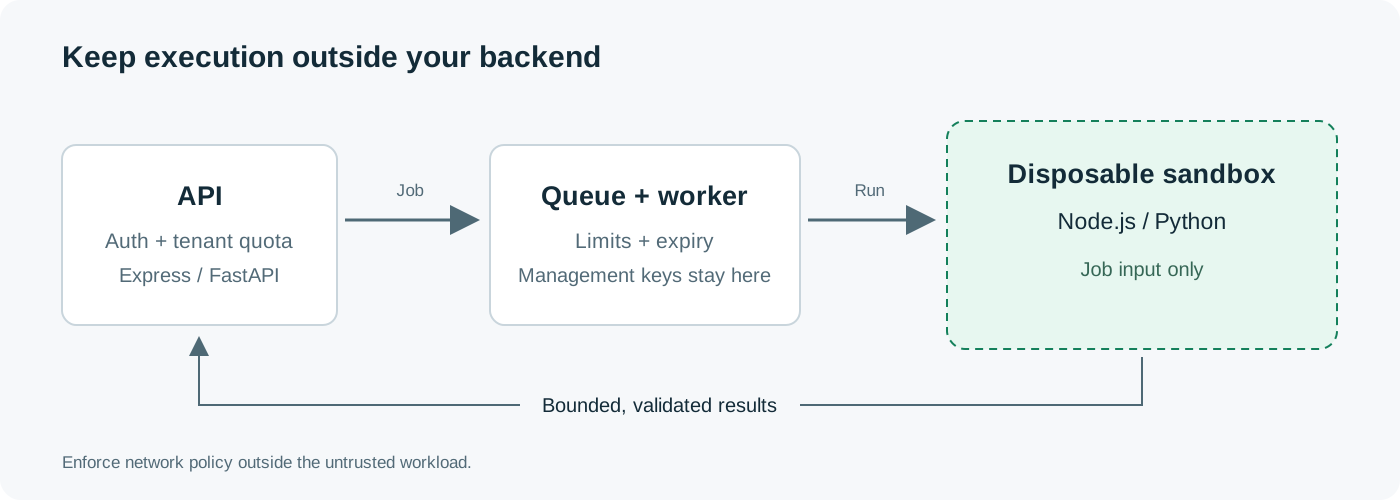
The backend should own the job record and access rules:
- Authenticate the caller and check their quota. Limit request bytes before buffering the source.
- Store the source as data. Assign the job to a tenant and choose a runtime from a fixed allowlist.
- Queue the job. A trusted worker creates a fresh sandbox with explicit limits and an expiry.
- Transfer only the job's input. Execute a fixed interpreter command, passing source through a file or stdin.
- Collect bounded output and status. Validate results before returning them or using them in another service.
- Stop and remove the execution environment. A separate cleanup worker handles abandoned jobs.
Keep the sandbox provider key, Docker socket and cloud control credentials in the trusted worker. User code must not receive the credentials that create or manage other sandboxes.
Check tenant ownership on every operation: execute, cancel, download, resume and delete. A client-supplied sandbox ID is an identifier, not proof of access. For the broader execution flow, see our AI sandbox guide.
Controls to set before the first user job
| Control | Starting policy for a small code runner |
|---|---|
| CPU and RAM | Fixed allocation; reject user-supplied resource flags |
| Wall time | A short external deadline, plus a maximum sandbox lifetime |
| Processes and files | Process-count, open-file and writable-storage limits |
| Input and output | For example, 32 KiB source and 64 KiB combined stdout/stderr; choose limits for your product |
| Filesystem | Read-only base image and a small scratch directory; no host home or application mounts |
| Credentials | No production secrets; use a narrow, short-lived grant only when needed |
| Network | Deny outbound access by default; explicitly allow required destinations |
| Tenant state | Fresh workspace per job, or a session tied to one tenant |
| Account usage | Per-user concurrency, submission-rate and spend limits |
CPU allocation limits how fast a busy loop runs. A wall-clock deadline limits how long it survives. Enforce both. Docker documents that containers have no CPU or memory constraints unless you configure them. Docker resource constraints.
Network policy needs to cover private services and cloud metadata as well as the public internet. If jobs need HTTP, enforce an allowlist at an egress proxy or network layer the guest cannot change. Check DNS resolution, IPv4/IPv6 destinations and redirects. A wrapper around fetch inside the guest cannot control every program the guest can launch. OWASP SSRF prevention.
Tested Docker launch examples for Node.js and Python
These commands demonstrate container launch controls with fixed sample programs. They do not include the external wall-time and output supervisor required for public submissions. Run them on an execution worker separated from your application servers. For a public hostile-code service, place that worker in the chosen VM boundary or use an appropriate sandbox runtime.
Use a trusted, patched image. The tags below are convenient for the example; pin the reviewed image digest in deployment and update it through your normal patch process. Pre-pull images before accepting jobs.
Node.js example
docker run --rm -i --init \
  --network none --read-only \
  --tmpfs /tmp:rw,noexec,nosuid,nodev,size=16m \
  --user 65534:65534 --cap-drop ALL \
  --security-opt no-new-privileges \
  --memory 128m --memory-swap 128m --cpus 0.5 \
  --pids-limit 32 --ulimit nofile=64:64 \
  --log-driver none \
  node:24-bookworm-slim node - <<'JS'
console.log(JSON.stringify({answer: 6 * 7}));
JS
The expected output is {"answer":42}. The command runs as UID 65534, drops Linux capabilities, keeps the root filesystem read-only and allows a small writable /tmp. It grants no external network interface and mounts no host directory.
Python example
docker run --rm -i --init \
  --network none --read-only \
  --tmpfs /tmp:rw,noexec,nosuid,nodev,size=16m \
  --user 65534:65534 --cap-drop ALL \
  --security-opt no-new-privileges \
  --memory 128m --memory-swap 128m --cpus 0.5 \
  --pids-limit 32 --ulimit nofile=64:64 \
  --log-driver none \
  python:3.13-slim-bookworm python -I -B -u - <<'PYCODE'
import json
print(json.dumps({"answer": 6 * 7}))
PYCODE
The expected output is {"answer": 42}. Python's -I reduces import-path and interpreter-environment interference. It does not prevent the program from using the OS resources its container allows. Python command-line options.
Keep Docker's default seccomp profile. no-new-privileges blocks privilege gains through mechanisms such as setuid executables. The --network none mode leaves only loopback. These controls have distinct jobs; none replaces the rest. Docker run options, seccomp, network isolation.
The scratch directory's noexec option prevents direct execution from that mount, but an interpreter can still read and run a script stored there. It does not prohibit user programs. The 128-MiB limit also suits these small examples, not every npm package or data-science workload.
Connect this to a backend without shell interpolation
On the trusted worker, construct the Docker or provider request from fixed arguments. Node can use spawn with shell: false; Python can use subprocess.Popen with an argument list. Send the submitted source through stdin or a fixed file path. Never place it inside a shell command such as a string passed to sh -c. See Node child processes and Python subprocess security.
Allow users to choose among approved runtime names. Do not let a request supply Docker flags, arbitrary images, host paths or environment-variable names. Package installation also executes code; if you support it, run it within the same isolation and resource policy.
Stop the workload, bound the output and confirm cleanup
A timeout around an HTTP request or SDK call can stop your backend waiting while the remote program keeps running. Likewise, killing a local Docker CLI process can leave its container alive.
The trusted supervisor needs to:
- Record the container or sandbox ID before execution starts.
- Read stdout and stderr incrementally, with a shared byte limit.
- On timeout or excess output, stop the actual workload through the runtime API.
- Close or drain attached streams without retaining unlimited data.
- Confirm termination, remove disposable state and record any cleanup failure.
--log-driver none in the examples prevents Docker from retaining container logs. Your backend must still cap the streams it reads. For Docker, stop the named container before ending the attached CLI. For a microVM service, use its documented termination operation and verify the terminal state.
Set a provider-side expiry where available. A finally block cannot run after the worker loses power, so keep a scheduled cleanup process that reconciles expired job records with live resources. Make cleanup safe to repeat. Do not mark an orphaned job successfully cleaned up just because the client disconnected.
What we checked
On October 31, 2026, we ran both commands on Docker Desktop with Engine 28.1.1, Linux kernel 6.10.14-linuxkit, ARM64, Node.js 24.22.2 and Python 3.13.18.
| Check | Result for both runtimes |
|---|---|
| Fixed calculation | Returned 42 |
| Effective user | UID 65534 |
Write under /etc | Blocked |
Write and read under /tmp | Worked |
| Outbound socket to a test address | Failed with ENETUNREACH |
| Host-only synthetic environment marker | Absent inside the container |
| Resource configuration | 128 MiB memory, no swap, 32 processes/threads, half a CPU |
| Privilege policy | NoNewPrivs enabled |
| Busy loop under the test supervisor | Stopped after its two-second deadline |
| Excess output under the test supervisor | Capture stopped at 64 KiB; workload terminated |
| New container after a previous job | Previous scratch file absent |
Our first output-limit check exposed a cleanup bug: the attached Docker CLI waited on a full pipe after the container stopped. We fixed the test supervisor to terminate the workload first, then end the attached client. That is why the launch command alone is not a complete runner.
These checks cover the local container configuration and supervisor behavior. They do not test kernel escapes, prove every access path is blocked or test Lizard's microVM isolation. Repeat the checks on the actual worker runtime you deploy.
Treat results and saved state as untrusted too
A sandbox can contain a program while its output attacks the next system. Escape stdout before rendering it. Validate returned JSON. Never deserialize a submitted Python pickle or evaluate a returned JavaScript string in the backend. Python pickle warning, OWASP output handling.
Serve generated HTML and previews from an origin that does not share your dashboard's credentials. For downloaded files, control names, sizes and types; avoid following guest-created symlinks into host paths. Limit archive extraction and decompression work as well.
Fresh state prevents one tenant from reading another tenant's files, package caches or in-memory values. Persistent sessions need explicit ownership and retention rules. A paused sandbox retains state; it should not become the next user's clean environment. Apply the same rules to snapshots and shared volumes.
Where Lizard fits
Lizard Sandboxes runs code in Firecracker microVMs, each with its own kernel. Lizard SDK supports JavaScript/TypeScript and Python, including file operations, command execution, status checks and lifecycle controls. Your backend can manage the execution environment through that API instead of operating its own worker hosts. Lizard Sandboxes documentation.
Keep the management API key in the backend. For hostile-code jobs, avoid passing lizardToken, which enables an in-guest project credential, or attaching agent credentials the task does not need. Set an explicit lifetime and terminate disposable jobs after collecting bounded results. Lizard SDK reference.
Firecracker isolation does not imply blocked outbound traffic. Check that the deployed network policy enforces your required destinations. The current SDK create-options reference does not document an egress allowlist; do not invent a flag or assume a guest-side proxy setting enforces one. If strict egress control is mandatory, verify an enforceable configuration before accepting that workload.
Start by defining the job's allowed files, network access and resource budget. Then test a fresh environment with those restrictions. Use the Lizard quickstart for the execution API and our sandbox pricing comparison when estimating costs.
Build with AI. Ship with Lizard.
You don't need a platform team to go live. Your whole cloud, one CLI command away.
- Services
- —
- Add-ons
- —
- Deployments
- —
- Sandbox starts
- —